A Systematic Investment Plan (SIP) can be stopped for a client directly from the Investwell platform, using the NSE systematic orders section. This guide walks through the three stages involved: finding the client's active systematic orders, initiating a cease request, and completing the process once the client authenticates the request.
Step 1: Locate the Client's Systematic Orders
Under the Invest Online NSE menu, click on Systematic Orders. The screen that opens asks you to select the status of the orders you want to view. Choose Running to see orders that are still active.
Next, enter the client's name in the Client Search field. Then select the Report Type. You can choose SIP, STP or SWP, depending on the kind of systematic order you want to stop. For stopping an SIP, select SIP.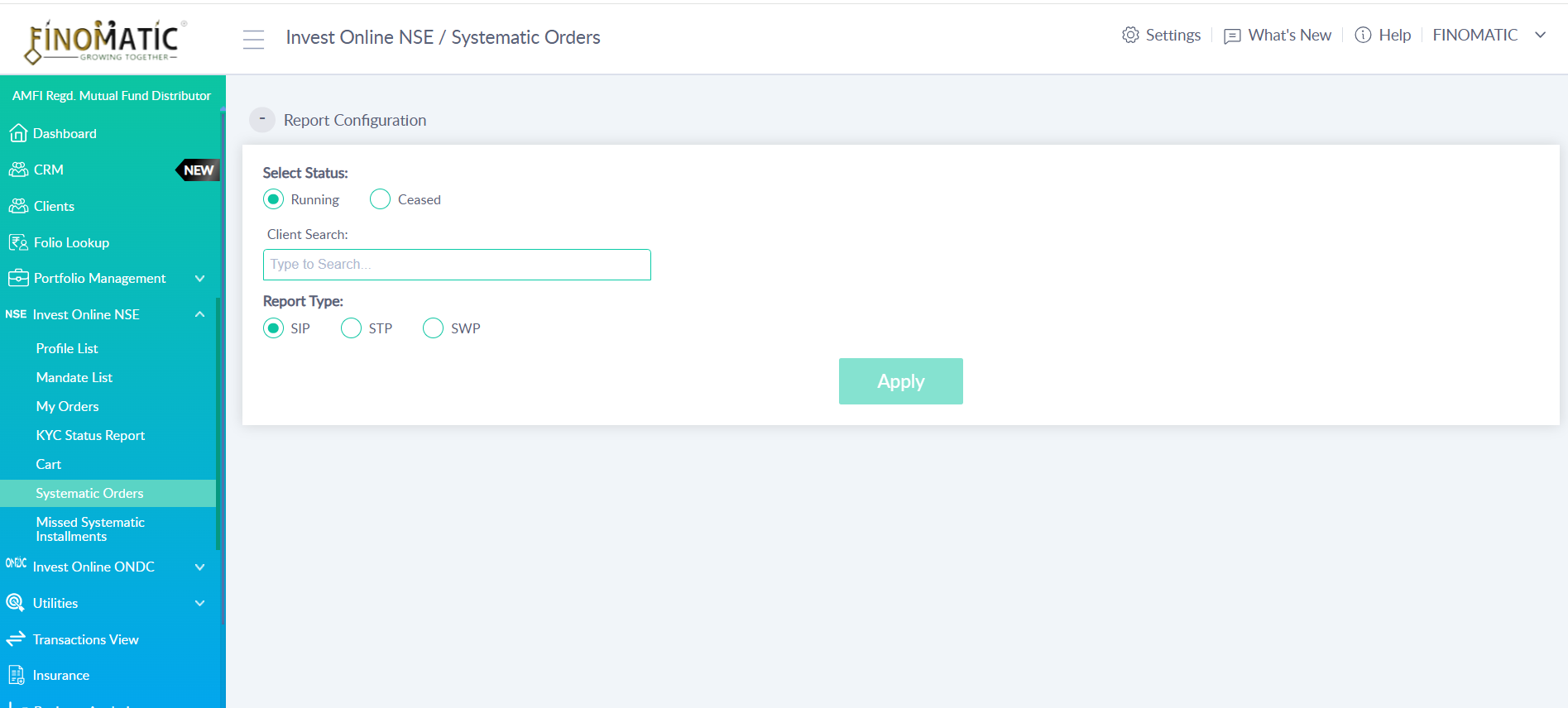
Step 2: Select the Order and Choose Cease
Click Apply. The system displays the complete list of systematic orders for the selected client. Each record shows details such as the scheme name, amount, frequency, start date, end date and registration date. Against each record, you will find a Modify button.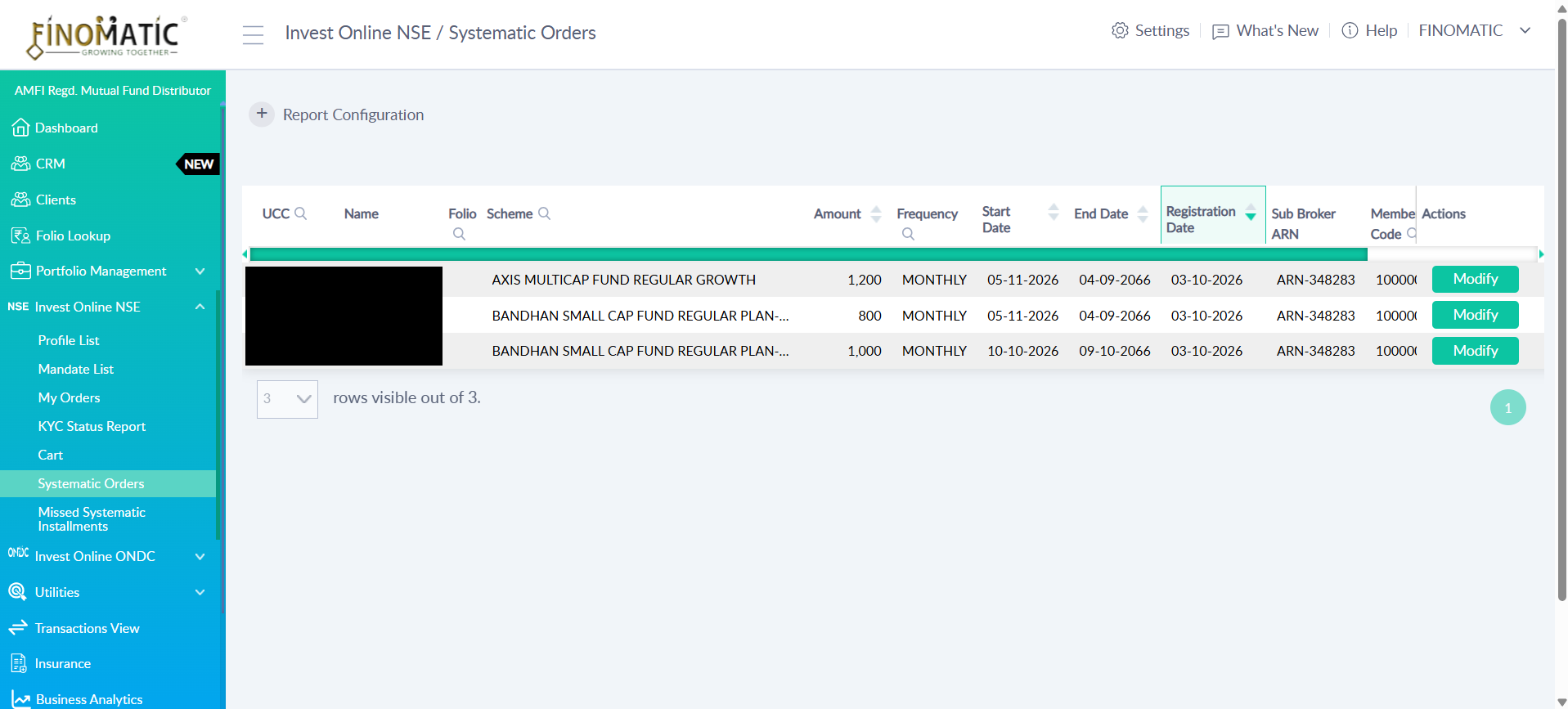
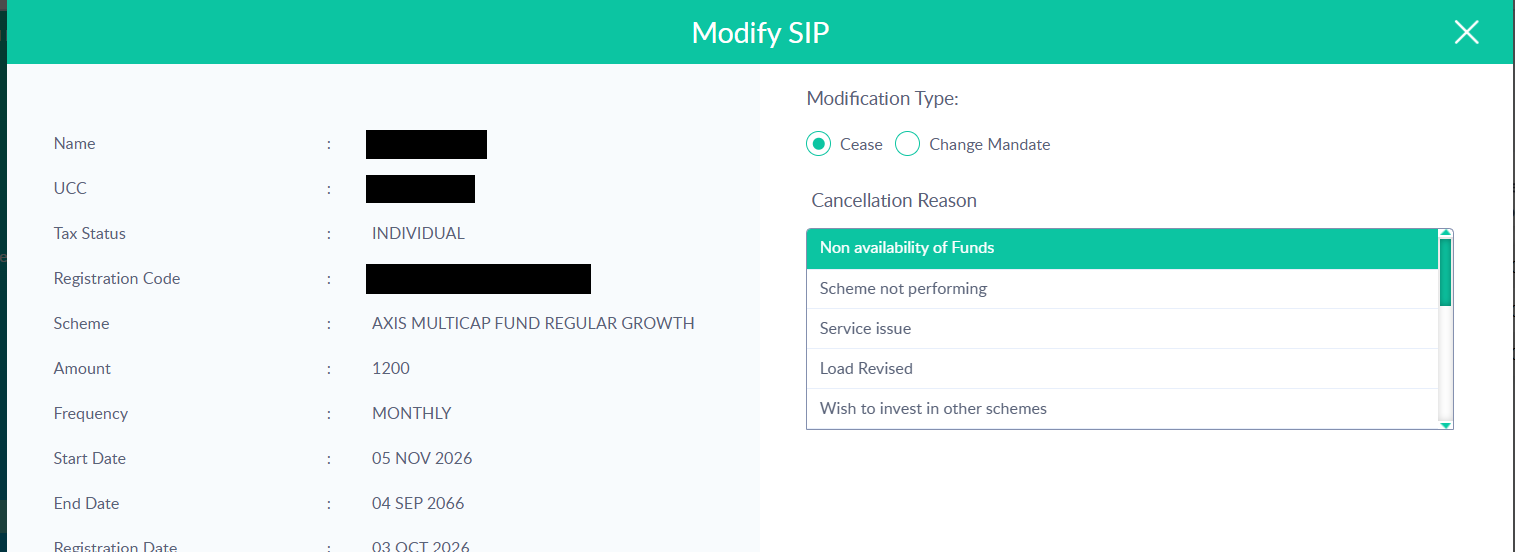
Click Modify on the SIP you want to stop. A Modify SIP window opens with the order details on the left and the modification options on the right. You will see two options under Modification Type: Cease and Change Mandate. Select Cease. Once Cease is selected, choose the reason for cancellation from the Cancellation Reason drop-down. The options include reasons such as Non availability of Funds, Scheme not performing, Service issue, Load Revised and Wish to invest in other schemes. Select the reason that matches the client's request.
Step 3: Submit the Request and Complete Client Authentication
After selecting the cancellation reason, click Submit. Once the request is submitted, the client receives an authentication link by email from NSE. The client needs to open this link and complete the authentication.
The cancellation order is processed successfully at the exchange end only after the client has completed this authentication.
FAQs
Q: Where do I find active SIPs for a client in NSE?
Under the Invest Online NSE menu, open Systematic Orders. Choose Running as the status, enter the client’s name in Client Search, select SIP as the Report Type, and click Apply.
Q: How do I stop an SIP in NSE?
Click Modify on the SIP you want to stop. In the Modify SIP window, select Cease under Modification Type, choose a reason from the Cancellation Reason drop-down, and click Submit.
Q: What does the client need to do after submission?
The client receives an authentication link by email from NSE and must complete authentication. The cancellation is processed at the exchange only after the client has done this.
Q: What options appear in the NSE Modify SIP window?
There are three options under Modification Type: Pause, Cease and Change Mandate. The article does not show a Pause option.
Q: Can an SIP be paused in NSE on Investwell?
Yes, Investwell supports pause for NSE now.
Q: How many installments can be paused in NSE?
NSE allows exactly 2 installments to be paused per request. This is mandatory: when a pause request is raised, 2 installments are paused.
Q: Can I choose a different number of installments in NSE?
No. The count is fixed at 2 by NSE’s condition, and Investwell has built this into the UI.
Was this article helpful?
That’s Great!
Thank you for your feedback
Sorry! We couldn't be helpful
Thank you for your feedback
Feedback sent
We appreciate your effort and will try to fix the article