This report is available in the portfolio management menu inside the Broker portal. You can use this to see the portfolio of all your clients together. It gives you the CAGR return along with the current gain of all the assets of the mutual funds of the clients.
You can view it investor-wise, family-wise, or folio-wise and you can export it in Excel. There are plenty of filters that can be used in this report.
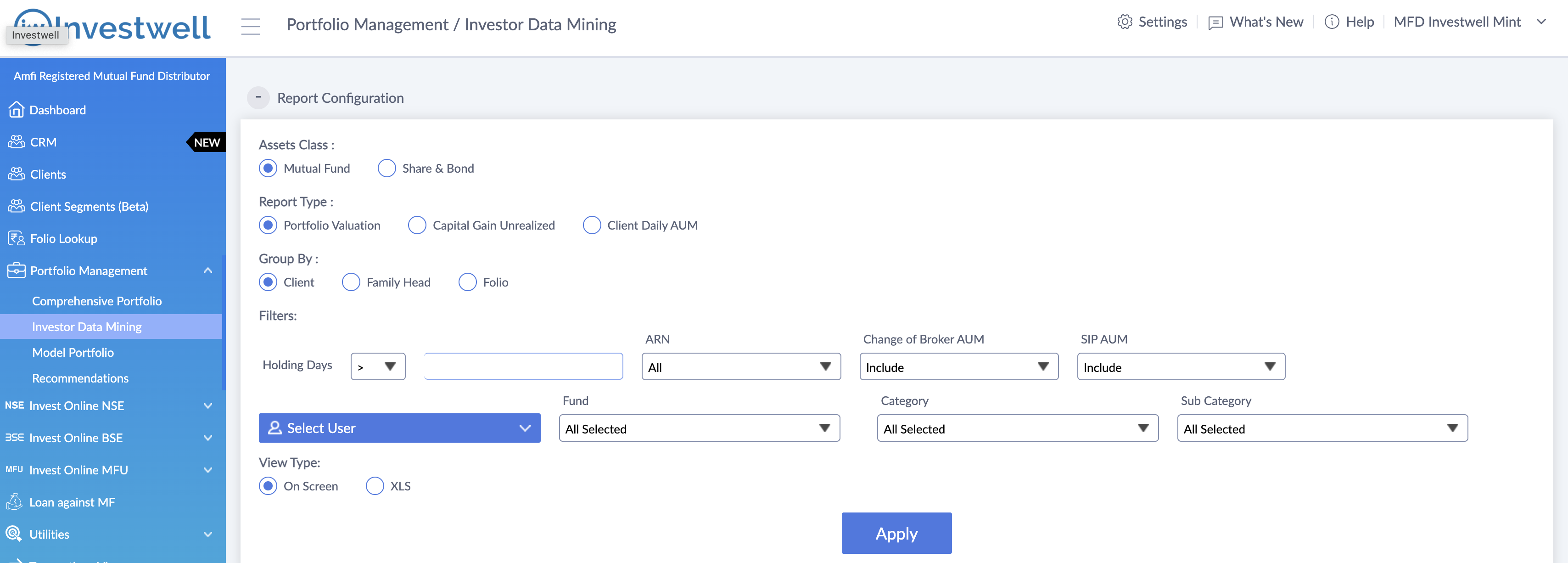
The most popular ones are the holding days filter and the change of broker AUM filter. You can filter this report by any hierarchy level, any RM or branch, and you can filter it also on the category if you want to see only the equity portion of your AUM. That can be done.
- The holding days filter can be used to view the portfolio of all your clients who have a holding greater than the X number of days.
- The ARN filter can be used to see the portfolio of all your clients for inside a particular ARN. If you have multiple ARNs then this is useful.
- The change of broker AUM filter can be used to see what part of your AUM amongst your clients is currently in use. The change of broker mode means you may not be earning commission on them.
- The SIP AUM filter is used to see your AUM which is obtained through an SIP mode.
- Select the fund and category filter can be used to show the portfolio in a particular fund or in a particular category like equity, debt, hybrid, liquid.
Was this article helpful?
That’s Great!
Thank you for your feedback
Sorry! We couldn't be helpful
Thank you for your feedback
Feedback sent
We appreciate your effort and will try to fix the article