Path:
Advisor Portal > Portfolio Management > Comprehensive Portfolio
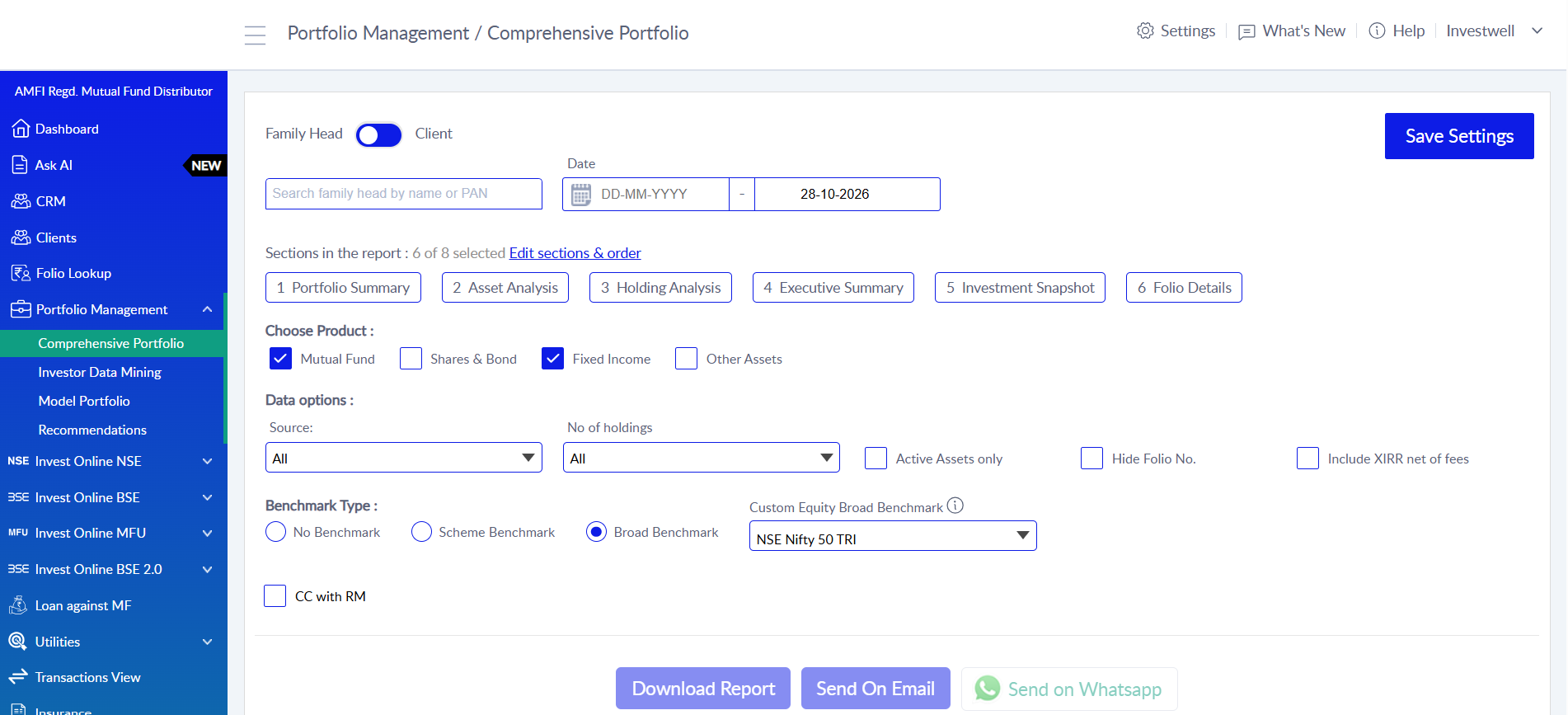
Objective:
The Comprehensive Portfolio report is a customizable portfolio review report for a client or a family. It brings together returns, asset allocation, underlying holdings, investment flows and gains in one report. A key use of the report is to check how the portfolio has performed against its benchmark or the broader market, by comparing the portfolio’s XIRR with the Benchmark XIRR.
The advisor chooses which sections to include, the order they appear in, and the products and data settings to apply. The report can be downloaded as a PDF, sent to the investor by email, or sent on WhatsApp.
Client Selection:
Family Head / Client toggle: generate the report for a whole family (by family head) or for an individual client.
Search: find the family head or client by name or PAN.
Date: set the period for the report using a from-date and to-date.
Sections:
Choose which sections to include and set their order using Edit sections & order. Available sections include:
Executive Summary: a one-page overview of the portfolio. It shows Total Portfolio Value, Gain, XIRR and Benchmark XIRR, so overall performance can be compared with the benchmark at a glance. It also shows allocation by family member (investor-wise current value and allocation %) and by product (Mutual Funds, PMS, Shares, etc.), plus a pie chart of allocation by asset category (Equity, Debt, Liquid and Ultra Short, Arbitrage, Other).
Asset Analysis: shows how the mutual fund portfolio is distributed. It breaks down current value and allocation by fund house (AMC), with the equity, debt, liquid, arbitrage and others split for each AMC. It also shows allocation by sub-category (e.g., Equity: Mid Cap, Debt: Credit Risk), by scheme, and an equity allocation split across Large Cap, Mid Cap and Small Cap.
Holding Analysis: looks through to the underlying stocks and papers held in the portfolio. It shows Allocation by Scrip (top stocks), Allocation by Sector, Allocation by Paper (top debt instruments) and Allocation by Rating (A1+, AAA, AA+, SOV, etc.). The number of scrips and sectors shown is controlled by the No. of Holdings setting.
Investment Snapshot: shows the money flow and returns for three periods: FY to date, Last FY and Since Inception. For each period it splits Equity, Hybrid and Debt & Other, and shows Opening Balance, Purchase, Switch In, Switch Out, Dividend Payout, Redemption, Net Addition, Closing Balance, Net Gain, XIRR Return (%) and Benchmark XIRR (%). This makes it easy to see whether each segment has beaten or lagged the market in each period.
Portfolio Summary: a bird’s-eye view of the entire portfolio since inception. It shows total return on investment, including realized gains, unrealized gains and dividends. It is useful for seeing profits booked, dividends earned since investing, and family-level summaries.
Folio Details: folio-level details of the client’s holdings.
Choose Product:
Select which asset classes are included in the report:
Mutual Fund
Shares & Bond
Fixed Income
Other Assets (such as PMS, Property, PPF)
Foreign Assets
Data Options:
Source: choose which holdings are included: All, Managed or External assets.
No. of Holdings: sets how many scrips and sectors are shown in the Holding Analysis section.
Active Assets only: shows only schemes with a unit balance and hides schemes with zero unit balance. When unchecked, all folios since the investor’s first investment are included.
Hide Folio No.: hides folio numbers in the report.
Benchmark Type:
Benchmark comparison is used to check the portfolio’s performance against the market. It applies to all sections of the report. Options:
No Benchmark: no benchmark comparison is shown.
Scheme Benchmark: each holding’s XIRR is compared with its own scheme benchmark.
Broad Benchmark: holdings are compared with a broad market benchmark.
Custom Equity Broad Benchmark: choose your own equity benchmark (for example, NSE Nifty 50 TRI). It is used to compare all equity holdings, meaning shares and equity-category mutual funds.
Other Options:
CC with RM: copies the client’s Relationship Manager when the report is sent by email.
Save Settings: saves the current configuration (sections, order, products, data options, benchmark) as the default for future reports.
Output:
Download Report (PDF)
Send on Email
Send on WhatsApp
FAQs:
Q1. What is the Comprehensive Portfolio report?
It is a customizable portfolio review report for a client or family. It combines returns, asset allocation, holdings, investment flows and gains in one PDF.
Q2. Where can I find the Comprehensive Portfolio report?
Go to Advisor Portal > Portfolio Management > Comprehensive Portfolio.
Q3. Can I use the Comprehensive Portfolio report to check performance against the market?
Yes. This is one of its main uses. The report compares the portfolio’s XIRR with the Benchmark XIRR in the Executive Summary and Investment Snapshot sections, which shows whether the portfolio has outperformed or underperformed the market.
Q4. How do I compare a client’s portfolio with a benchmark?
Select Scheme Benchmark or Broad Benchmark under Benchmark Type. The report then shows Benchmark XIRR next to the portfolio’s XIRR across all sections.
Q5. Can I generate the Comprehensive Portfolio report for a whole family?
Yes. Use the Family Head / Client toggle to generate it for a whole family or for an individual client. You can search by name or PAN.
Q6. Which sections are available in the Comprehensive Portfolio report?
Executive Summary, Asset Analysis, Holding Analysis, Investment Snapshot, Portfolio Summary and Folio Details.
Q7. Can I change the order of sections in the Comprehensive Portfolio report?
Yes. Click Edit sections & order to choose which sections to include and arrange their order.
Q8. What does the Executive Summary section show?
Total portfolio value, gain, XIRR and benchmark XIRR, plus allocation by family member, by product and by asset category.
Q9. What does the Asset Analysis section show?
Allocation of the mutual fund portfolio by AMC, sub-category, scheme, and market cap (Large, Mid and Small Cap).
Q10. What does the Holding Analysis section show?
The underlying stocks and debt papers in the portfolio, with allocation by scrip, sector, paper and credit rating.
Q11. What does the Investment Snapshot section show?
Opening balance, purchases, switches, dividends, redemptions, closing balance, net gain, XIRR and benchmark XIRR for FY to date, Last FY and Since Inception. Each is split by Equity, Hybrid and Debt & Other.
Q12. What does the Portfolio Summary section show?
The complete return on investment since inception, including realized gains, unrealized gains and dividends.
Q13. Which products can be included in the Comprehensive Portfolio report?
Mutual Fund, Shares & Bond, Fixed Income, Other Assets (such as PMS, Property and PPF), and Foreign Assets.
Q14. How do I control how many stocks and sectors appear in Holding Analysis?
Use the No. of Holdings option under Data Options.
Q15. How do I hide schemes with zero units from the Comprehensive Portfolio report?
Check Active Assets only. Only schemes with a unit balance will be shown.
Q16. Can I hide folio numbers in the Comprehensive Portfolio report?
Yes. Check Hide Folio No. under Data Options.
Q17. What is the difference between Scheme Benchmark and Broad Benchmark?
Scheme Benchmark compares each holding with its own scheme benchmark. Broad Benchmark compares holdings with a broad market index.
Q18. Can I choose my own benchmark for equity holdings?
Yes. Use Custom Equity Broad Benchmark (for example, NSE Nifty 50 TRI). It applies to shares and equity mutual funds.
Q19. Can I save my report settings as default?
Yes. Click Save Settings to save the current configuration as the default.
Q20. How can I share the Comprehensive Portfolio report with the investor?
Download it as a PDF, send it by email, or send it on WhatsApp.
Q21. Can the Relationship Manager be copied on the report email?
Yes. Check CC with RM before sending on email.
Was this article helpful?
That’s Great!
Thank you for your feedback
Sorry! We couldn't be helpful
Thank you for your feedback
Feedback sent
We appreciate your effort and will try to fix the article