Reference Document — Role Levels & Reporting Structure
1. Overview
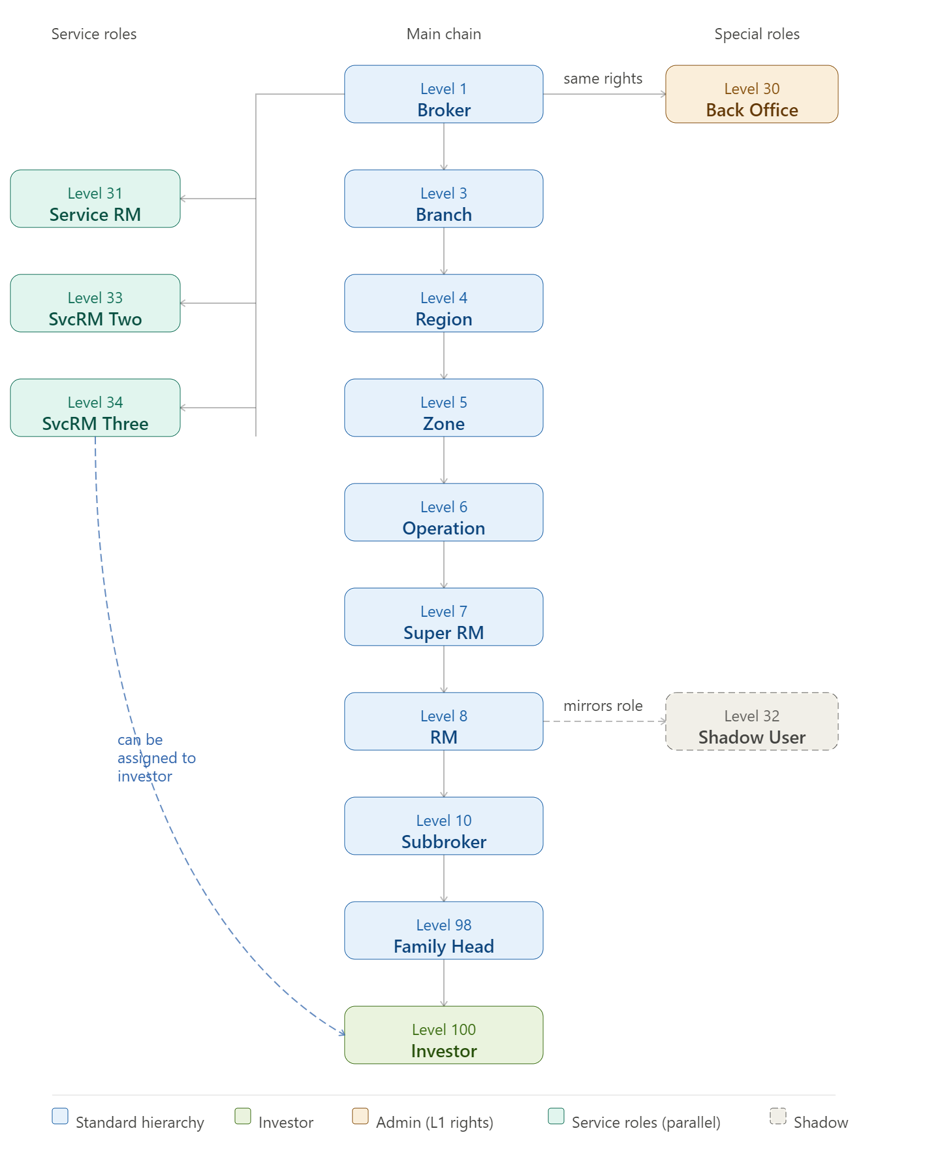
This document describes the organisational hierarchy system used to define user roles, reporting lines, and access rights across the platform. The hierarchy follows a top-down structure where Level 1 (Broker) is the highest authority and Level 100 (Investor) sits at the bottom of the standard chain.
The numbering is not strictly sequential — gaps in level numbers (e.g., 1, 3, 4…) reflect system design decisions, and special roles (30, 31, 32, 33, 34) carry unique behavioural rules distinct from the main chain.
2. Standard Hierarchy Chain
The primary reporting chain follows a strict top-down, one-to-many structure:
Level 1 (Broker) → Level 3 (Branch) → Level 4 (Region) → Level 5 (Zone) → Level 6 (Operation) → Level 7 (Super RM) → Level 8 (RM) → Level 10 (Subbroker) → Level 98 (Family Head) → Level 100 (Investor)
Each node in the chain can have multiple children (one-to-many downward linkage). For example, a single Broker can oversee multiple Branches, each Branch can have multiple Regions, and so on. However, Level 100 (Investor) cannot be assigned to more than one Level 98 (Family Head) — it is a strict single-parent relationship at the bottom of the chain.
3. Full Role Reference Table
Level | Role Name | Description | Special Attributes |
1 | Broker | Highest level in the hierarchy. Root authority. | Top of hierarchy |
3 | Branch | Reports to Broker (Level 1). | — |
4 | Region | Reports to Branch (Level 3). | — |
5 | Zone | Reports to Region (Level 4). | — |
6 | Operation | Reports to Zone (Level 5). | — |
7 | Super RM | Reports to Operation (Level 6). | — |
8 | RM | Reports to Super RM (Level 7). | — |
10 | Subbroker | Reports to RM (Level 8). | — |
30 | Back Office | Reports directly to Broker (Level 1). Has same viewing rights as Level 1. | Same rights as Level 1 |
31 | ServiceRM | Parallel support role. Can be assigned to Level 100 (Investor). Reports directly to Level 1. | Parallel with 33 & 34 |
32 | Shadow User | Mirrors the rights of the user type selected during creation. Reports to the same level as the mirrored user. | Dynamic rights, mirrors role |
33 | ServiceRmTWO | Parallel support role. Can be assigned to Level 100 (Investor). Reports directly to Level 1. | Parallel with 31 & 34 |
34 | ServiceRmThree | Parallel support role. Can be assigned to Level 100 (Investor). Reports directly to Level 1. | Parallel with 31 & 33 |
98 | Family Head | Reports to Subbroker (Level 10). Cannot have multiple Level 10s. | No multi-parent |
100 | Investor | Lowest level in the standard hierarchy. Reports to Family Head (Level 98). Cannot be assigned to multiple Level 98s. | Bottom of hierarchy |
4. Special Roles
4.1 Level 30 — Back Office
• Reports directly to Level 1 (Broker), bypassing all intermediate levels. All Clients are visible by default to this level
• Has the same viewing/access rights as Level 1 (Broker). Except Brokerage and Settings.
• Acts as an administrative support role at the top of the hierarchy.
4.2 Level 32 — Shadow User
• A Shadow User does not have fixed rights of its own.
• Its access rights are dynamically inherited from the user type selected at the time of creation.
• It reports to the same level as the user it shadows.
• This allows controlled delegation of access without creating a new role type.
4.3 Levels 31, 33 & 34 — Service RM Roles (Parallel Support)
• ServiceRM (31), ServiceRmTWO (33), and ServiceRmThree (34) are parallel roles — they exist at the same tier and do not report to each other.
• All three report directly to Level 1 (Broker).
• Unlike all other roles, Levels 31, 33, and 34 can be assigned simultaneously to a single Level 100 (Investor).
• This is the only exception to the single-parent rule at Level 100 — an Investor can have multiple Service RM roles assigned at the same time.
5. Key Rules Summary
• Top-down, one-to-many: A parent node can have multiple children at the next level.
• Single-parent rule at Level 100: An Investor (Level 100) cannot be assigned to more than one Family Head (Level 98). Exception: Levels 31, 33, and 34 can all be assigned to the same Investor simultaneously.
• Level 30 is administratively equivalent to Level 1 in terms of viewing rights.
• Level 32 inherits its rights from its paired user type; it has no independent access profile.
• Levels 31, 33, and 34 are lateral peers — they do not have a hierarchical relationship among themselves and all anchor directly to Level 1.
Was this article helpful?
That’s Great!
Thank you for your feedback
Sorry! We couldn't be helpful
Thank you for your feedback
Feedback sent
We appreciate your effort and will try to fix the article