KYC Missing - Compliance Report
On this page
Overview
In the compliance report, the KYC Missing report pulls the latest KYC status directly from CAMS or KFintech. Get the latest status check by clicking Refresh Data from RTA. You’ll see each folio alongside scheme name, investor name, PAN, AUM, holdings, and several KYC flags - including KYC 1, KYC 2, and KYC 3, which indicate the KYC status of joint holders, as well as guardian fields and tax status.
Click Refresh Data from RTA to fetch the latest CAMS/KFintech status. This report can be used to find the number of clients whose KYC is missing. To find this report, navigate to Data Management -> Compliance Report -> In the dropdown select KYC Mis
Why It Matters
Mutual fund transactions require verified KYC. Until every holder’s KYC is recorded, including joint accounts, clients cannot transact in those schemes.
Action Steps
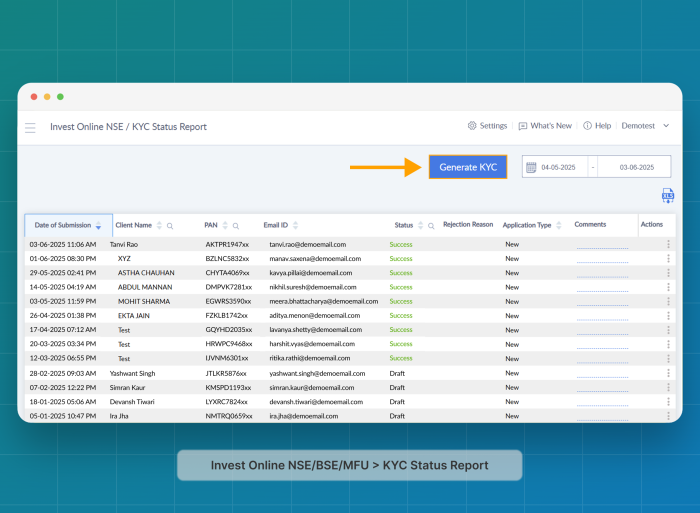
1. Use Investwell Mint’s KYC Workflow (recommended)
- In Investwell Mint, go to:
Broker Dashboard > Invest Online NSE/BSE/MFU > KYC Status Report >
2. Or Go Directly to the KRA Portal
-
Go to CAMS or KFintech eKYC Portal.
-
Complete the KYC process by uploading the required documents for each folio holder.
In the compliance report,
Was this article helpful?
Still stuck? Email support@investwellonline.com.